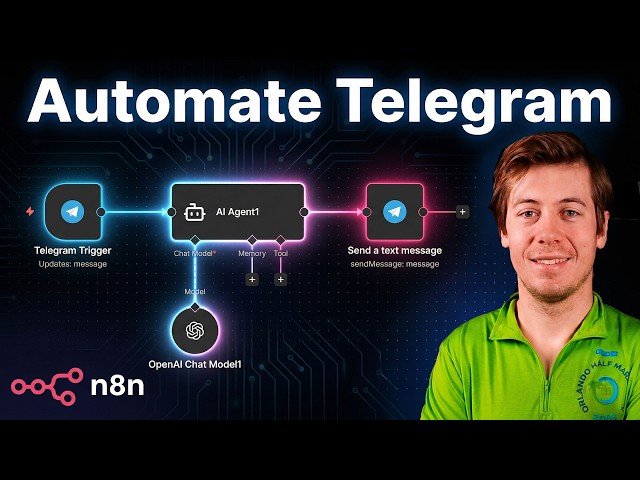
Step-by-step walkthrough for integrating Telegram with n8n workflows: install the desktop app, create a bot via BotFather, configure credentials, and use Telegram triggers and nodes. Demonstrates sending/receiving messages, obtaining chat IDs, toggling attribution, and building a simple AI-agent workflow with human-in-the-loop review. Also covers triggers, common node actions, execution testing, and practical tips for production setups.
– Setup: Install Telegram desktop, link your phone, and create a bot with BotFather to obtain the HTTP API token and credential.
– Triggers & Nodes: Use Telegram triggers (e.g., on message) — note API limits (one trigger per bot). Explore messaging actions like send a text message, get chat info, download files, and admin operations.
– AI & Human-in-the-loop: Route incoming messages into an AI agent, capture outputs, pause for manual review or rejection, then send automated replies back to the chat.
– Tips & Testing: Find chat IDs from trigger output, toggle attribution on responses, execute workflows in test mode, and label credentials for multi-bot production setups.
Quotes:
Use Telegram as the human in the loop — send yourself a message, confirm it, then continue the workflow.
BotFather is the one bot rule of all.
If you don’t like the output of an AI agent, you can completely reject it and stop your workflow.
Statistics
| Upload date: | 2026-01-28 |
|---|---|
| Likes: | 27 |
| Comments: | 4 |
| Statistics updated: | 2026-02-12 |
Specification: Connect Telegram in n8n + Example Workflows
|